為了因應這種系統, 在 Python 下你不能使用 telnet class 進行連線, 但你可以使用 Simon Tatham 先生寫的 plink.exe (Putty 命令列版), 安全地做你想作的事.
首先下載 plink.exe (Putty 的命令列版本)
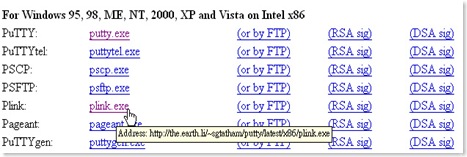
plink 的使用教學
使用 ssh telnet 連線
c:\plink -ssh login.example.com
login as:
自動連上(包含 username 與 passwd)
在遠端機器上, 批次執行一堆指令c:\plink -ssh login.example.com -l(空格)名字 -pw(空格)密碼
c:\plink -ssh login.example.com -l(空格)名字 -pw(空格)密碼 命令1;命令2ex:c:\plink -ssh login.example.com -l(空格)名字 -pw(空格)密碼 ls;echo Hello World;ls
使用Python 呼叫plink遠端連線
Python 搭配 plink 進行遠端 ssh 批次處理的 code
Python 搭配 plink 進行遠端 ssh 批次處理的 code
import os
host="192.168.0.1"
user="username"
passwd="passwd"


com_array=["cd ~jing",
           "ls -la",
           "ftpget -u jing -p passwd ipaddress a.zip b.zip",
           "exit"]

# Step 1: the remote command
Batch_command=""
for command in com_array:
        Batch_command=Batch_command+command+";"
        #print Batch_command
print "Batch_command="+Batch_command

# Step 2: the user info
UserLogin="-l "+user+" "+"-pw "+passwd

# Step 3: the plink command
PlinkCommand="plink.exe -ssh "+host+" "+UserLogin+" "+Batch_command

print "PlinkCommand="+PlinkCommand
os.system(PlinkCommand);

print "Job done!"
參考資料


